How to Access SEC Financial Data in ChatGPT
The SEC-API.io plugin gives ChatGPT access to 20 million filings from 1993 to today across 500 filing types, updated within 300 milliseconds of publication on EDGAR. It replaces ChatGPT's incomplete and outdated filing data with the SEC-API.io database via a MCP server. There is nothing to install and no process to run, and setup takes around 2 to 5 minutes. This blogpost explains how to set it up and how to get started.
On this page:
- How to connect the SEC-API.io MCP Server with ChatGPT
- What you need
- Step-by-Step Guide
- How to get started
- Example prompts
- Financial statements from 10-K filings
- Risk factor changes between annual reports
- Institutional holdings and 13F positions
- IPO filings and investment advisers
- Efficiency hacks
- FAQ
- Resources and links
How to connect the SEC-API.io MCP Server with ChatGPT
What you need
- ChatGPT on the web at chatgpt.com, the ChatGPT desktop app or the Codex CLI.
- SEC-API.io MCP server URL:
https://api.sec-api.io/mcp?apiKey=YOUR_API_KEY - A SEC-API.io API key: Get a free API key via https://sec-api.io/signup
Step-by-Step Guide
Option 1: ChatGPT on the web (chatgpt.com)
Follow the two steps to connect the SEC-API.io Plugin to ChatGPT. Once done its connected for all sessions, not just one conversation.
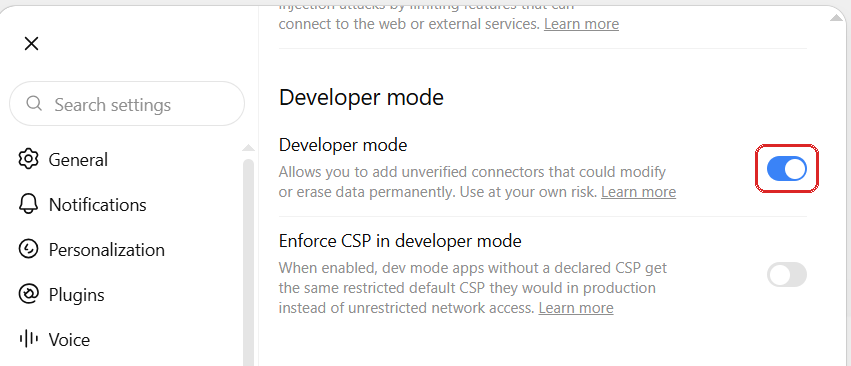
Step 1. Open 'Settings' -> 'Security and login'. Scroll to the 'Developer mode' section and turn Developer mode 'on'. ChatGPT states that developer mode allows unverified connectors that could modify or erase data. Availability depends on the account and the workspace policy - on Team and Enterprise plans only an owner can add connectors.
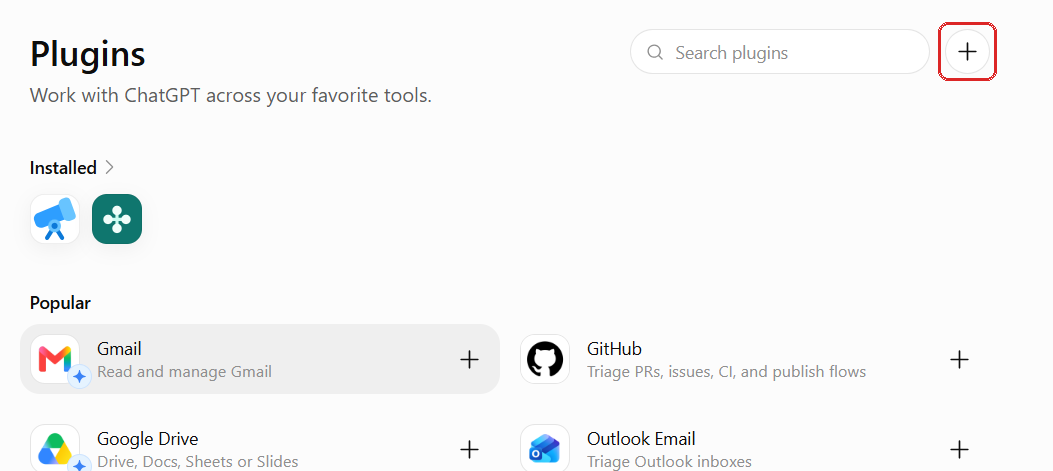
Step 2. Open 'Plugins' in the left sidebar and click the 'plus' button at the top right of the page, next to the search field.
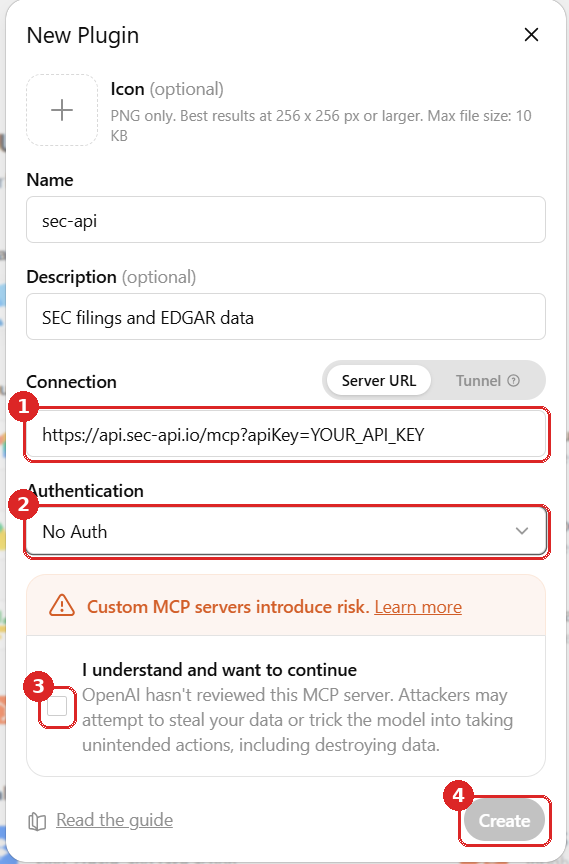
Step 3. The 'New Plugin' dialog opens. Enter a name, for example sec-api. Leave Connection set to Server URL and paste the endpoint URL into the address field: https://api.sec-api.io/mcp?apiKey=YOUR_API_KEY. Set Authentication to No Auth, marked 2, because the key in the URL is the only credential the server needs.
Step 4. Tick "I understand and want to continue", marked 3, and click Create, marked 4.
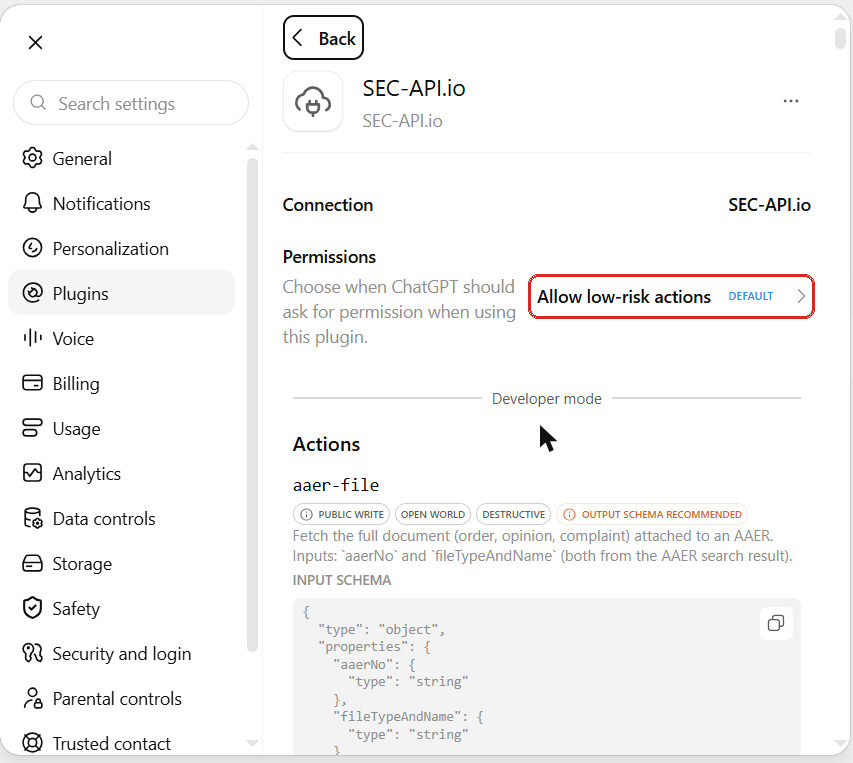
The connection page then shows the permission setting for the plugin, marked below, and under 'Actions' every tool the server exposes with its name, its description and its input schema.
If the connection fails, check that the URL includes the /mcp path and your API key. A VPN or a firewall on the local machine is not the cause of a failed connection.
Option 2: ChatGPT desktop app and Codex
The Codex CLI, the ChatGPT desktop app and the IDE extension share one file. Configure it once and all three can use the plugin.
          1
          codex mcp add sec-api --url "https://api.sec-api.io/mcp?apiKey=YOUR_API_KEY"
The command writes the entry into ~/.codex/config.toml, which is TOML and not JSON. The same result can be written by hand:
          1
          [mcp_servers.sec-api]

          2
          url = "https://api.sec-api.io/mcp?apiKey=YOUR_API_KEY"
Common mistakes. The table name is
mcp_serverswith an underscore. A block written as[mcp.servers."name"]does nothing and produces no error. Theurlkey is what selects the HTTP transport, do not add acommandkey as well. Codex requires HTTPS for remote servers.
How to get started
Turn the connector on for a conversation with the 'plus' button in the composer, then ask in plain language (see example below). ChatGPT picks the endpoints and chains the calls itself, so a question that spans several datasets does not have to be broken into separate requests. The 49 tools cover filing search, full text search, XBRL financials, insider trades, 13F holdings, 8-K items, executive compensation, Form ADV and the SEC enforcement databases.
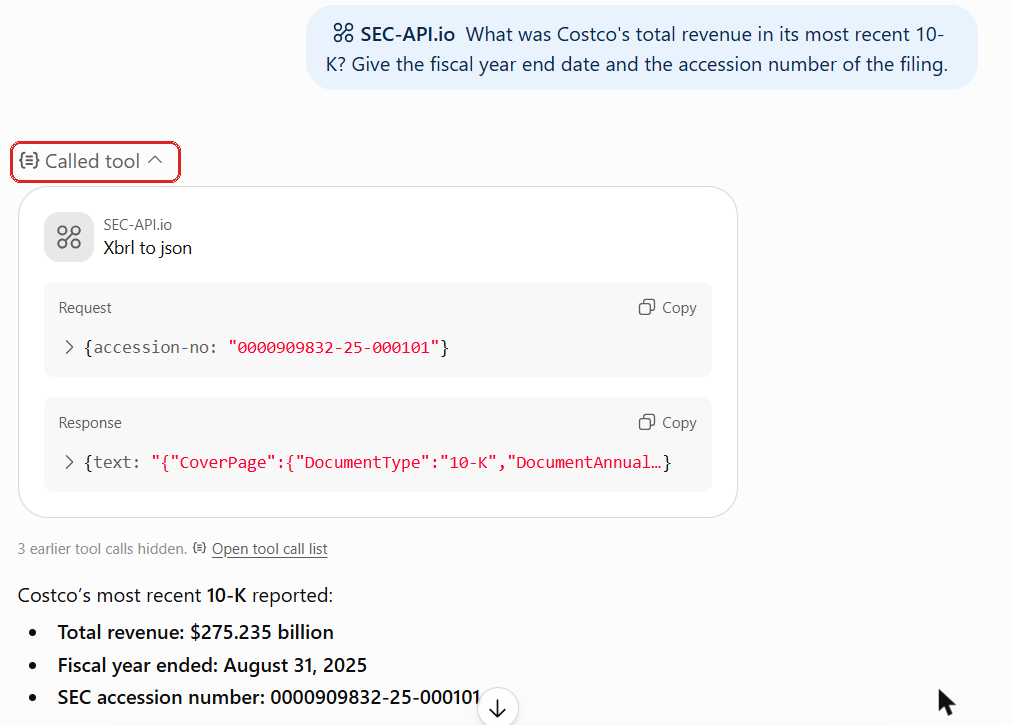
Expanding the 'Called tool' block, marked above, shows which tool ran, the request ChatGPT sent and the response it received, so the answer can be traced to the filing it came from.
Example prompts
Financial statements from 10-K filings
| Prompt | What it returns |
|---|---|
| "Pull NVIDIA's income statement, balance sheet and cash flow statement from its last three 10-K filings, and chart revenue and gross margin by year." | Standardized XBRL statements per fiscal year, plus the derived margin trend |
Risk factor changes between annual reports
| Prompt | What it returns |
|---|---|
| "Summarize the differences between the risk factors from Lam Research's two most recent 10-K filings." | An Item 1A comparison covering added, removed and materially expanded risks |
Institutional holdings and 13F positions
| Prompt | What it returns |
|---|---|
| "Get Leopold Aschenbrenner's last two 13F holdings, and calculate the delta between all positions and AUM." | Position level reconciliation, plus an Excel file |
| "Which institutional managers reported the largest new positions in Palantir last quarter?" | 13F holdings screened across every filer, ranked by position size |
IPO filings and investment advisers
| Prompt | What it returns |
|---|---|
| "Which companies filed confidentially for an IPO recently?" | Unsealed DRS filings paired with their public S-1 or F-1 |
| "Look up Bridgewater's Form ADV: assets under management, client types, fee arrangements and any disclosure items, plus its latest Part 2 brochure." | Part 1A items and Schedule A to D detail, with links to the Part 2 brochures |
More prompts are in the Financial Analysis Prompt Library.
Do you need an identifier?
Usually you do not need one. Name the identifier (company's Ticker, CIK, accession number for a specific filing) when the company or firm name is ambiguous, for example when several registrants share a name or when a manager files under an entity name that differs from the brand.
How to get the output you want?
Each step below adds detail to the one above it.
- Format: "give me an Excel file", or Word, PDF, HTML, Markdown, MDX, plain text, a chart or an image.
- Graphic type: "make it a bar chart".
- Chart detail: "make it a horizontal bar chart of the quarter over quarter change, sorted from largest decline to largest increase, on a zero anchored axis".
- Visual spec: "content dense, neutral colors, one typeface, labelled bars".
Say nothing about the output and ChatGPT returns prose. A tighter specification reduces the amount of rework.
Efficiency hacks
Set the order of operations
Stating the sequence is optional, but it is faster and more accurate on work that spans several steps. State the sequence in the prompt e.g. resolve the ticker to a CIK, find the filing, extract the section, compute the figures, then chart them. Fixing the sequence keeps ChatGPT from calling a tool before it has the identifier that tool needs.
Reuse a prompt that works
Once a prompt produces the output you want, keep it somewhere that is read automatically instead of pasting it again. In ChatGPT on the web, a project holds instructions that apply to every chat inside that project, so the sequence, the identifiers and the output specification are applied without being repeated. In Codex, an AGENTS.md file in the repository root is read at the start of a session, so the same instructions can be committed alongside the code they are used with.
Restricting what the plugin can do
When the connection is created, ChatGPT lists every tool it found on the server under 'Actions' on the connection page, with the name, the description and the input schema of each. That list is what the model can call.
Approval is set under Settings, then Plugins, then Permissions, and the same setting appears on the connection page for each plugin. There are three settings:
| Setting | Behaviour |
|---|---|
| Always ask | ChatGPT asks before reading or making changes. |
| Allow read actions | ChatGPT reads without asking and asks before making changes. |
| Allow low risk actions | ChatGPT approves low risk actions automatically and may deny actions involving sensitive information. |
Allow low risk actions is the default. The SEC-API.io server is read only against SEC data, so Always ask produces a confirmation on every query, and 'Allow read' actions runs queries without a prompt.
On ChatGPT Team and Enterprise plans, developer mode and connectors are governed by the workspace policy and only an owner can add a connector. A workspace owner therefore controls which servers exist for the workspace at all, independently of what an individual member configures.
FAQ
What is an MCP server?
An MCP server exposes a set of tools over a defined protocol so that an assistant can call them. The SEC-API.io server is remote and runs over HTTP at https://api.sec-api.io/mcp, so there is nothing to install and no local process to keep running. It exposes 49 tools covering the SEC-API.io datasets.
What is developer mode in ChatGPT? Developer mode is the setting under Settings, then Security and login, that allows a custom MCP server to be added from the Plugins page. A custom server has not been reviewed by OpenAI, and its write actions run against the accounts it is connected to. Availability depends on the account and the workspace policy, and on Team and Enterprise plans only an owner can add connectors.
Which Authentication option applies to the SEC-API.io server?
No Auth. The API key travels in the apiKey query parameter of the endpoint URL, so there is no OAuth client to configure. Leaving Authentication on OAuth makes the connection fail.
Does my API key leave my machine?
Yes. The key sits in the endpoint URL, and ChatGPT connects to api.sec-api.io from OpenAI infrastructure rather than from the local machine. Treat the URL as a secret and rotate the key from the account page if it leaks.
The connector is added but ChatGPT does not use it. Turn the connector on for the conversation with the plus button in the composer, then repeat the question naming the data you want, for example the form type or the dataset. Confirm on the connection page that the tool list was discovered.
Calls fail with an authentication error.
The key in the URL is wrong or has been rotated. Copy the key again from the SEC-API.io account page, including the /mcp path and the full key, and update the connection or the url value in ~/.codex/config.toml.
Does this work in the ChatGPT desktop app?
Yes, through the Codex configuration instead of the web settings. The desktop app, the Codex CLI and the IDE extension read ~/.codex/config.toml, so one [mcp_servers.sec-api] entry serves all three.
What is the difference between this and ChatGPT web search? Web search retrieves pages that a search index has crawled and returns the text on them. The MCP server queries the SEC-API.io database directly and returns records from EDGAR filings, covering 20 million filings from 1993 to today across 500 filing types, updated within 300 milliseconds of publication, including XBRL financial statements, insider transactions, 13F holdings and Form ADV data that are held in the filings rather than on indexed web pages.
Resources and links
- SEC-API.io MCP server documentation
- Financial Analysis Prompt Library
- Get a free API key
- How to Access SEC Financial Data in Claude
Educational content about accessing and analysing SEC filing data. Not investment advice, legal advice, or a recommendation to buy or sell any security.
Last updated: 14 September 2026