How to Access SEC Financial Data in Claude
On this page:
Connecting the SEC-API.io MCP server to Claude replaces its incomplete and outdated filing data with the SEC-API.io database. It gives you access to 20 million filings from 1993 to today. Nothing to install and no process to run. Setting it up takes around 2-5 minutes.
What you need
- Claude: the web or desktop app at claude.ai
- Or Claude Code, if you prefer the terminal
- Installed and authenticated: Desktop quickstart
- No-install web version at claude.ai/code
- A SEC-API.io API key: Get a free key
- The SEC-API.io MCP server: Endpoint and setup documentation
The SEC-API.io MCP Server URL: https://api.sec-api.io/mcp?apiKey=YOUR_API_KEY
Options
1: Connect in Claude on web or desktop
Use this if you work in claude.ai or the desktop app.
-
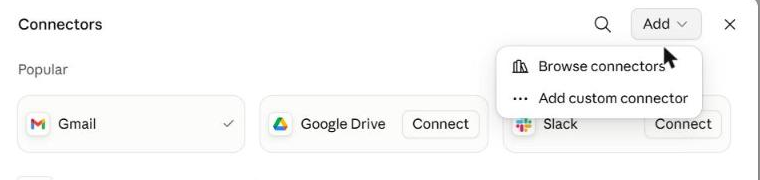
Open Settings → Connectors, click Add → Add custom connector.
-
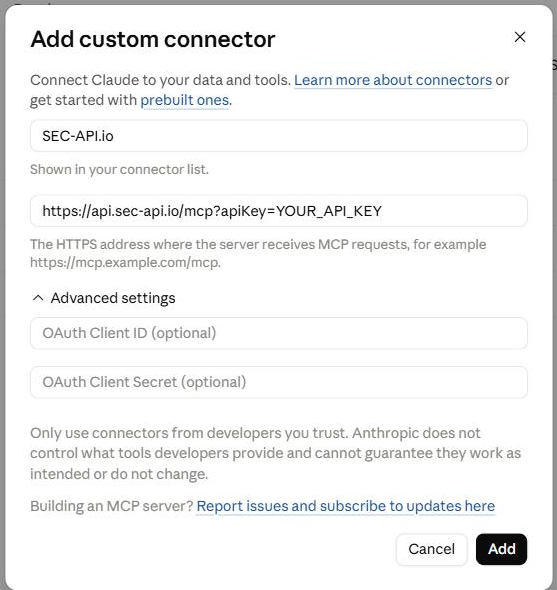
Enter a name and paste the URL including your API key. Leave OAuth Client ID and Client Secret empty. Click Add, then Connect.
-
The connector appears in your list as type
Web Custom.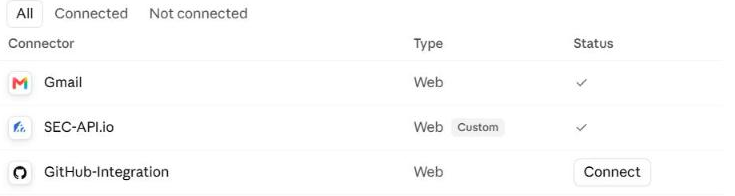
-
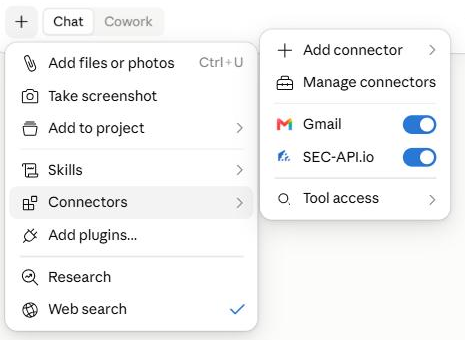
Turn it on per conversation with the + button in the composer.
Claude connects from Anthropic's servers, not from your machine. A local VPN or firewall is never the cause of a failed connection.
2: Connect from the terminal with Claude Code
One command. Run it in the project you want the server available in.
          1
          claude mcp add --transport http sec-api "https://api.sec-api.io/mcp?apiKey=YOUR_API_KEY"

Verify:
          1
          claude mcp list

To share the server with a repository instead, commit a .mcp.json in the project root:
          1
          {

          2
            "mcpServers": {

          3
              "sec-api": {

          4
                "type": "http",

          5
                "url": "https://api.sec-api.io/mcp?apiKey=YOUR_API_KEY"

          6
              }

          7
            }

          8
          }
Common mistake:
.claude/settings.jsondoes not define MCP servers. It only approves servers already defined in.mcp.json. A config pasted there is ignored silently, with no error. For a private setup, use~/.claude.json.
Start using it
Ask in plain language. Claude picks the endpoints and chains the calls itself. 49 tools cover filing search, full-text search, XBRL financials, insider trades, 13F holdings, 8-K items, executive compensation, Form ADV, and the enforcement databases.
Example Prompts
| Prompt | What it returns |
|---|---|
| "Pull NVIDIA's income statement, balance sheet and cash flow statement from its last three 10-K filings, and chart revenue and gross margin by year." | Standardized XBRL statements per fiscal year, plus the derived margin trend |
| "Which companies filed confidentially for an IPO recently?" | Unsealed DRS filings paired with their public S-1/F-1 |
| "Summarize the differences between the risk factors from Lam Research's two most recent 10-K filings." | Item 1A diff: added, removed and materially expanded risks |
| "Get Leopold Aschenbrenner's last two 13F holdings, and calculate the delta between all positions + AUM" | Position-level reconciliation, plus an Excel file |
| "Which institutional managers reported the largest new positions in Palantir last quarter?" | 13F holdings screened across every filer, ranked by position size |
| "Look up Bridgewater's Form ADV: assets under management, client types, fee arrangements and any disclosure items, plus its latest Part 2 brochure." | Part 1A items and Schedule A-D detail, with links to the Part 2 brochures |
More prompts, each with its output and the underlying data: Financial Analysis Prompt Library.
Do you need an identifier?
None, usually. Give Claude a ticker or a name.
Claude resolves the key each dataset is filed under: CIK for companies and their filings, CIK plus accession number for one specific filing, a CRD number or SEC file number (801-, 802-) for investment advisers and Form ADV, CUSIP for the positions inside a 13F. Name the identifier yourself only when the company or firm name is ambiguous.
Filing search covers every EDGAR form type, not only the ones with a dedicated tool: 10-K, 10-Q, 8-K, S-1, 13D/G, Form 144, Form D, N-PORT, N-CEN and the rest, back to 1993.
How to get the output you want?
You get the output you ask for, so be as specific as you like. Each step below adds detail:
- Format: "give me an Excel file", or Word, PDF, HTML, Markdown, MDX, text, a chart or an image
- Graphic type: "make it a bar chart"
- Chart detail: "make it a horizontal bar chart of the quarter-over-quarter change, sorted from largest decline to largest increase, on a zero-anchored axis"
- Visual spec: "content-dense, neutral colors, one typeface, labelled bars"
Say nothing about the output and you get prose. The tighter the spec, the less rework. Two worked examples: 13F holdings chart · earnings graphic from an 8-K.
Efficiency Hacks
Set the order of operations
Optional, but faster and more accurate on multi-step work. State the sequence: resolve the ticker to a CIK → find the filing → extract the section → compute → chart. Claude stops guessing and stops re-fetching.
Save the prompt as a skill
Once a prompt works, tell Claude to save it as a skill. In Claude Code it writes .claude/skills/<name>/SKILL.md, and the workflow is available in every later session by name, with no re-prompting.
Restricting what the server can do
Every tool can be set to Always allow, Needs approval, or Blocked, individually or by category.
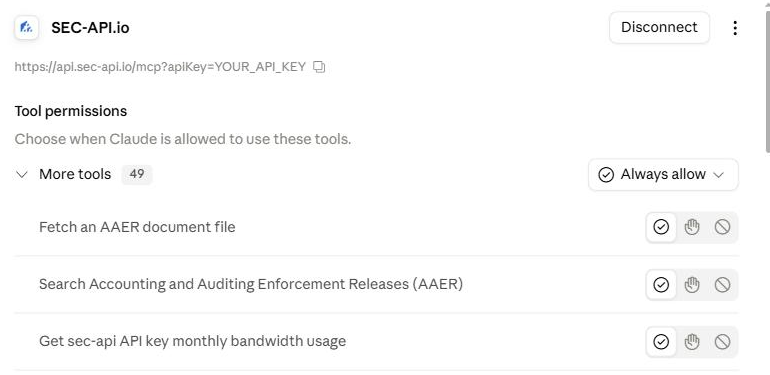
On Team and Enterprise plans, owners set these org-wide under Settings → Connectors and individual users cannot override them.
FAQ
What is an MCP server? MCP (Model Context Protocol) is an open standard that lets an AI assistant call external tools. A connector is one MCP server registered with Claude. SEC-API.io exposes its APIs as tools; Claude decides which to call.
What is a skill? A saved instruction set, a SKILL.md file, that Claude loads on demand. Use it to freeze a prompt you have tuned: the data sources, the calculation, the output format.
Does my API key leave my machine? Yes. In both setups the key sits in the endpoint URL, and Claude connects to api.sec-api.io from Anthropic's infrastructure. Treat the URL as a secret and rotate the key from your account page if it leaks.
The server is registered but Claude ignores it. Enable it for the conversation. In the terminal, run /mcp to check status; in web and desktop, use the + button in the composer.
Calls fail with an authentication error. The key is wrong or was rotated. Copy the URL again from your account page. Also confirm the URL still ends in /mcp.
Resources & Links
- SEC-API.io MCP server documentation: endpoint, per-assistant setup, troubleshooting
- Financial Analysis Prompt Library: prompts with outputs and source data
- API documentation: every dataset reachable through the server
- Works the same way with ChatGPT, Codex and Gemini CLI. See Connect an assistant.